Oakblush: Where Playful Script Meets Polished Design
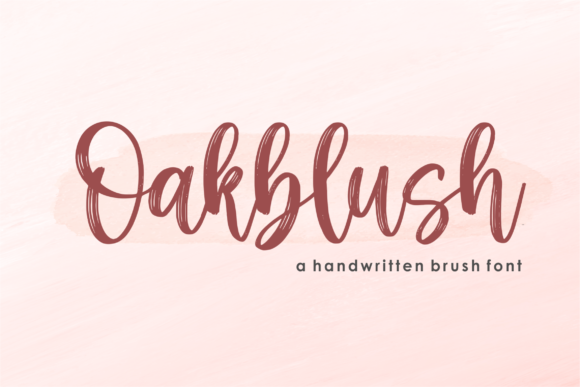
There’s a certain magic in a font that feels both personal and professional. Oakblush, a delightful script typeface from Qwrtype Foundry, strikes that balance with effortless charm. Its characters don’t just sit on the page—they dance along the baseline with a lively, handwritten rhythm that injects immediate personality into any project. This isn’t a formal, rigid calligraphy; it’s a modern, approachable script that feels like a friendly note written in beautiful penmanship.
At its core, Oakblush is a premium font designed for impact. The letterforms feature a fluid, connected flow with gentle swashes and subtle variations in stroke width, mimicking the natural pressure of a skilled hand. This gives it an organic, human touch that’s increasingly valuable in our digital world. The overall visual style is cheerful, inviting, and slightly whimsical without tipping into childish territory. It’s the kind of creative font that can make a logo feel more bespoke, a headline more engaging, or a social media graphic more relatable. If you’re searching for a script font that feels authentic and full of life, Oakblush deserves a close look.
Where Oakblush Truly Shines: Practical Applications
Knowing where a font excels is just as important as liking its look. Oakblush’s playful characters and clear legibility make it a versatile design asset, but it’s particularly powerful in specific contexts.
- Branding & Logo Design: For businesses that want to project approachability and creativity—think bakeries, boutique studios, wedding planners, or artisanal product lines—Oakblush can form the cornerstone of a memorable brand identity. It works beautifully for logos, wordmarks, and monograms where a personal touch is key. Pair it with a clean sans serif font for body text to create a balanced and professional font pairing.
- Packaging & Product Design: On labels, boxes, and tags, Oakblush adds a handcrafted, premium feel. It can make a product stand out on a crowded shelf by communicating care and creativity, which is essential for packaging design in the food, cosmetics, or lifestyle sectors.
- Digital & Social Media: In the fast-scrolling world of social media, a display font like Oakblush can stop thumbs. Use it for Instagram quote graphics, Pinterest pins, YouTube thumbnails, or website headers to inject personality. Its friendly style is perfect for engaging a community and making digital content feel more human.
- Editorial & Publishing: While not for long-form body copy, Oakblush is excellent for editorial design elements like chapter titles, pull quotes, magazine headers, or book covers, especially in genres like romance, lifestyle, or young adult fiction. It adds a layer of emotional resonance.
- Events & Personal Projects: From wedding invitations and greeting cards to custom planners and hobbyist crafts, Oakblush brings a bespoke elegance. It’s a fantastic tool for anyone creating personal design assets that need to feel special and unique.
Making Oakblush Work for You: A Designer’s Guide
Integrating any new typeface into your toolkit requires a thoughtful approach. Here’s how to evaluate and use Oakblush effectively to enhance your projects.
Evaluating Project Fit and Readability
First, assess the tone of your project. Oakblush’s personality is friendly, creative, and slightly informal. It’s a fantastic fit for projects that aim to be welcoming, personal, or artistic. For corporate, legal, or highly technical content, a more neutral serif font or sans serif font might be more appropriate. Always test for readability in context. While clear for a script, it’s best used for short bursts of text—headlines, subheads, logos, or single lines—not for paragraphs of body copy. View it at the size it will be used to ensure the charming details remain crisp and legible.
Mastering Font Pairings and Hierarchy
The true power of a display font like Oakblush is realized in how it pairs with other typefaces. A classic and effective strategy is to combine it with a simple, geometric sans serif font (like Montserrat, Lato, or Open Sans). The sans serif provides clean, readable body text and supports the visual hierarchy, allowing Oakblush to command attention as the headline or accent font. This creates a professional font pairing that feels both dynamic and balanced. Use Oakblush to establish the primary emotional tone, then let the supporting font handle the functional communication.
Exploring the Full Toolkit
When you acquire a premium font like Oakblush, explore the full package. Check for OpenType features—these are the extra glyphs and alternates that can elevate your work. Look for stylistic alternates (different versions of certain letters), swashes (extended decorative strokes), and ligatures (special combined characters). These features allow you to customize the look, avoid repetitive letter shapes, and make your designs feel truly unique. Also, review the licensing carefully. If you’re using it for a commercial font project—like client work, merchandise, or a paid app—ensure you have the correct license for your use case.
A Final, Practical Recommendation
My advice? Don’t just admire Oakblush in a specimen sheet. Download it and put it to work on a real project. Mock up a logo for a fictional client. Create a social media series for a hobby you love. Design a label for your homemade jam. Seeing how it behaves in a real layout, with your own content, is the best way to understand its strengths and how it can enhance your creative workflow. Add it to your most ambitious ideas, and watch how its charming, dancing characters can make them stand out from the crowd.